
Getting started
Welcome to Watchlabb
Watchlabb is a marketplace where only original watches are bought and sold. Individual members and approved stores offer their watches on the same platform. Phone and identity verification show that every member who posts a listing is a real person.
Choose a section below; each one answers the questions on its subject.
Sections
What Watchlabb is for
Watchlabb was set up to make buying and selling original watches better recorded, more transparent and safer. Every member who posts a listing verifies their phone number and identity. Individual listings are reviewed before they go live. Stores open only after they are verified with documents or a social media account.
Watchlabb takes no commission on sales. Members and stores reach each other directly and agree the price, delivery and terms themselves.
Who it is for
- Individual members selling a watch: You can post listings within your monthly free listing limit, put your watch up for auction or offer it to our approved stores with Trink Saat.
- Collectors and watch lovers: You can browse listings, contact sellers directly, bid in auctions and add the watch you are looking for to Watch Radar.
- Stores selling original watches: You can open your own store page as a Verified Dealer or Registered Dealer and publish listings without waiting for review.
Watchlabb features
- Listings: Individual members can publish 10 listings a month for free. Listings go live after review.
- Stores: A store page for those who sell watches as a business. Store listings go live without review.
- Trink Saat: We offer your watch to our approved stores within 2 hours and pass the best offer on to you.
- Auctions: Live bidding on watches in sessions every Wednesday and Sunday.
- Watch Radar: You save the watch you want and your preferences, and get a notification when a matching listing goes live.
- Favourites: Save the listings and stores you like and follow them in one place.
The member panel menu
Once signed in, you manage your listings, bids and account settings from the member panel.
On desktop
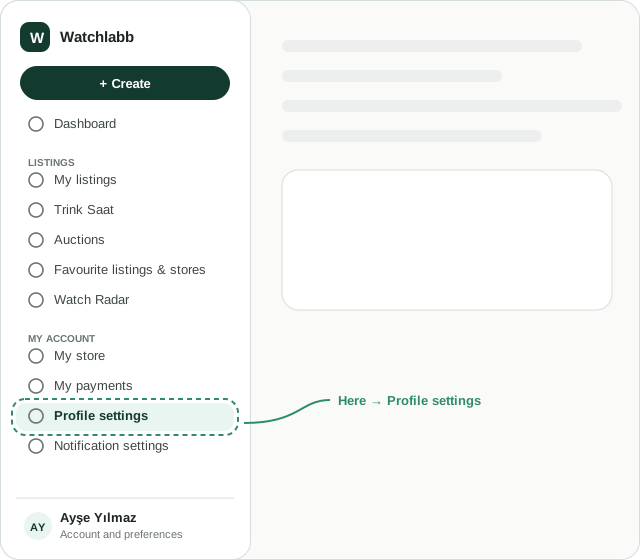
The menu sits on the left of the screen:
- Create: opens List a watch, Add a watch to auction, Create a Trink Saat listing and Watch I'm looking for.
- Dashboard: a summary of your listings, bids and notifications.
- Listings: My listings, Trink Saat, Auctions, Favourite listings & stores and Watch Radar.
- My account: My store, My payments, Profile settings and Notification settings.
- The row with your name at the bottom: language, currency and theme preferences, and Sign out.
On mobile
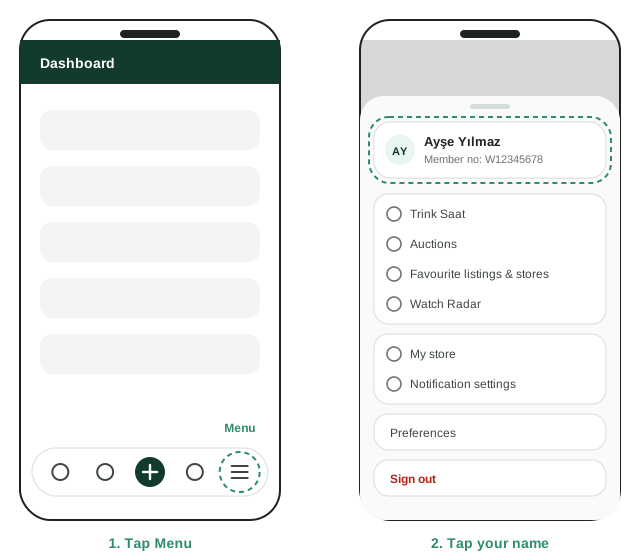
The bar at the bottom of the screen has five buttons: Dashboard, My listings, the + in the middle (a new listing, auction, Trink Saat or a watch you are looking for), Auctions and Menu.
All other pages are in the Menu. It opens from the bottom: at the top is the card with your name and member number, then Trink Saat, Auctions, Favourite listings & stores, Watch Radar, My store, Notification settings, Preferences and Sign out. To close it, tap outside it or swipe down.
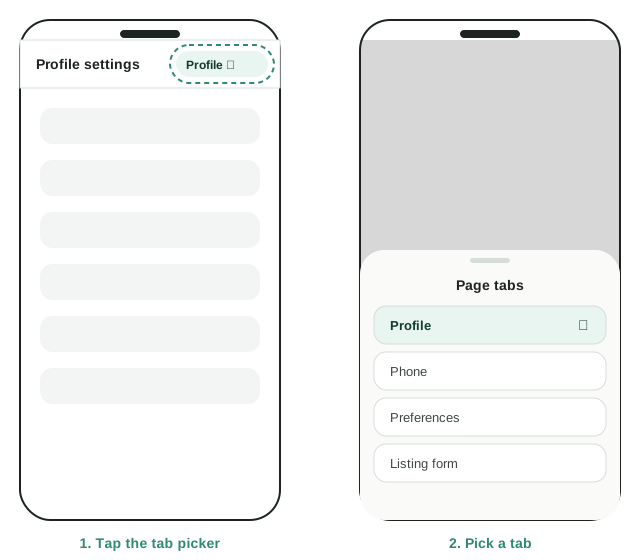
On pages with several tabs, such as Profile settings, the tabs are in a picker in the top bar. Tap the picker to open the Page tabs list, then tap the tab you want.