

Membership and account
You can join Watchlabb for free in a few steps with WhatsApp, Google or Microsoft. There is no password to create. Phone and identity verification show that every member who posts a listing is a real person.
In this section
- Signing up and ways to sign in
- Phone and identity verification
- Profile settings, e-mail address and signature code
- Preferences and notification settings
- Deleting your account
Who can join Watchlabb?
Anyone aged 18 or over can join Watchlabb. Your age is checked during identity verification; members under 18 cannot list watches or open a store.
Is membership paid?
No. Joining Watchlabb is free.
How do I sign up with WhatsApp?
You sign up with a code sent to your mobile number on WhatsApp:
- On the sign-in screen, open the Sign up tab and tap Continue with WhatsApp.
- Choose your country code, enter your mobile number and tap Send code to WhatsApp.
- Enter the 6-digit code you receive on WhatsApp and tap Verify.
- At the Your details step, enter your first and last name and tap Complete sign-up.
Signing up this way also verifies your phone number.
How do I sign up with my Google or Microsoft account?
On the Sign up tab, tap Continue with Google or Continue with Microsoft and choose your account. Your first and last name are taken from that account. You are then asked to verify your phone number; you can tap Later to skip this step for now.
Can I sign up with my e-mail address?
New accounts are opened with WhatsApp, Google or Microsoft. E-mail sign-in is for members who signed up with an e-mail address before. Once you have joined, you can add an e-mail address to your account in Profile settings.
Can I sign up with a number from outside Türkiye?
You can sign up with numbers from many countries. If your number's country is not supported, the screen says so. In that case you can sign up with your Google or Microsoft account.
What do I need to fill in on the Welcome form?
Only your first and last name are required on the Welcome form. Gender, date of birth, country, city and address are optional. The form appears when your first or last name is missing from your Google or Microsoft account.
Do I need a separate membership to open a store?
No. A store is opened by applying from your member account. You need a verified phone number and identity to apply.
Which agreements am I asked to accept when I first open my dashboard?
The first time you open your dashboard, you are asked to accept the Membership Agreement and the Platform Terms of Use. Read them and tap I have read and accept.
What is the "Get offers on WhatsApp?" question after I verify my phone?
It lets you choose whether to receive Watchlabb's offers and announcements on WhatsApp. Pick Yes, send me offers or No, listing notifications only. The same screen also shows your personal signature code. You can change your choice later in the Campaigns and news row of Notification settings.
Which sign-in methods can I use?
The Sign in tab has four options: Continue with Google, Continue with Microsoft, Continue with email and Continue with phone number. Choose the method you signed up with or one you have verified on your account.
Do I need to create a password?
No. Watchlabb has no passwords. You sign in with a one-time code sent to WhatsApp or your e-mail, or with your Google or Microsoft account.
How do I sign in with my e-mail address?
Tap Continue with email, enter your address and tap Send code. Enter the 8-digit code sent to your inbox and tap Sign in. Codes are only sent to e-mail addresses registered on Watchlabb.
How do I sign in with my phone number?
Tap Continue with phone number, enter your number and type in the 6-digit code you receive on WhatsApp. This option is for members who have already verified their phone number on their account.
I signed up with e-mail. Can I also sign in with my phone number?
Yes. Once you verify your phone number on your account, you can sign in to the same account by phone.
- Sign in with Continue with email.
- Verify your number at the Verify your phone number step or in Profile settings › Phone.
- From then on, use Continue with phone number to open the same account.
Signing in with e-mail keeps working too.
Can I sign in with a Google or Microsoft account that uses the same e-mail address?
Yes. When you sign in with a Google or Microsoft account that has the same e-mail address as your Watchlabb account, your existing account opens. When a new sign-in method is added to your account this way, we send a notice to your e-mail address.
I do not remember how I signed up.
First try your Google and Microsoft accounts, then ask for a code with your e-mail address. Use phone sign-in only if you have verified your number before. If you cannot find your account, write to our support team.
I signed in with my phone and my listings are missing.
If you signed in with a phone number you had not verified on your account, a new, empty account was opened. Sign out and sign in with the method you used to sign up (Google, Microsoft or e-mail). Then verify your number in Profile settings › Phone. Because the number is on the empty account, the screen guides you; follow the steps to move the number to your main account.
The phone verification step appears every time I sign in.
You are reminded of this step until you verify your phone number. You can verify your number now or tap Later to skip it. A verified phone number is needed to list watches, open a store and verify your identity.
My e-mail sign-in code does not arrive.
Check your spam folder. Codes are only sent to e-mail addresses registered on Watchlabb, and at most 5 codes an hour can be sent to the same address. If your address is not registered, sign in with Google, Microsoft or your verified phone number.
I entered the wrong code too many times. What should I do?
After several wrong codes in a short time, phone sign-in is locked for 15 minutes. Request a new code once the 15 minutes are up.
Google sign-in does not work on a page I opened inside another app.
Google and Microsoft sign-in do not work on pages opened inside apps such as Instagram, Facebook or TikTok. Continue with your phone number, or use the ⋯ menu at the top right to open the page in Chrome or Safari.
It says my account is suspended.
You cannot sign in to a suspended account. Please write to our support team at destek@watchlabb.com.
How do I sign out?
- On desktop: Click the row with your name at the bottom of the left menu and choose Sign out.
- On mobile: Tap Menu at the bottom and then Sign out at the end of the menu.
Can I sign up with my Apple account?
No. Signing up and signing in with Apple are not available. You can join Watchlabb with WhatsApp, Google or Microsoft.
I signed up with Apple. How do I sign in?
Sign in with Apple has been closed. If you shared your real e-mail address, sign in with Continue with e-mail or with a Google or Microsoft account that has the same address. If you hid your e-mail and have verified your phone number before, sign in with your phone number. If you have not verified your phone, you need to sign up again.
How do I know if I used a hidden Apple address?
Apple's hidden addresses end in @privaterelay.appleid.com. On your iPhone, Settings › your name › Sign-In & Security › Sign in with Apple shows which address you shared with Watchlabb.
How do I add my real e-mail address to an account registered with a hidden Apple address?
If you have verified your phone number before, first sign in with Continue with phone number. Then go to Profile settings › Profile › E-mail, tap Add email and enter the 6-digit code sent to your new address. From then on you can sign in with that address using Continue with email.
Why should I verify my phone number?
A verified phone number is needed to post listings, Trink Saat listings and auction listings, apply for a store, start identity verification and bid in auctions. WhatsApp notifications, your signature code and phone sign-in also rely on a verified number.
How do I verify my phone number?
You verify your phone number on the Phone tab of Profile settings:
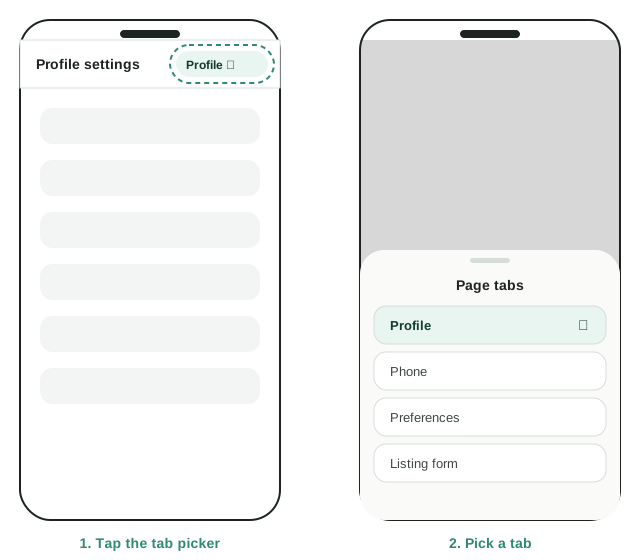
- Open Profile settings and go to the Phone tab. On mobile, pick the tab from the tab selector in the top bar.
- Enter your mobile number in New number and tap Send code.
- Enter the 6-digit code you receive on WhatsApp and confirm.
If you signed up by phone, your number is already verified.
Can I skip phone verification?
Yes, you can skip it with Later. You can browse the site and view listings. To post listings, open a store, verify your identity and bid in auctions, you need to verify your number.
How do I change my phone number?
In Profile settings › Phone, enter your number in New number, tap Send code and enter the 6-digit code you receive. Your registered number stays the same until the new one is verified. If your account has an e-mail address, we send a notice there when the number changes.
The WhatsApp code does not arrive.
Check your number and country code; the number must be used on WhatsApp. You can ask for a new code after 90 seconds. For Turkish (+90) numbers you can also ask for it by SMS once the waiting time is over.
I do not use WhatsApp. How do I get the code?
For Turkish (+90) numbers we can also send the code by SMS; the option appears on the code screen once the waiting time is over. For numbers from other countries the code is sent by WhatsApp only.
Can I use a landline number?
No. Because the code is sent by WhatsApp or SMS, only mobile numbers are accepted.
It says my number is on another account.
It means the number has been used with another account. Follow the steps on screen and enter the code sent to the number. You can then switch to that account, or move the number to this account if the other one is empty. If both accounts have listings or other content, write to our support team.
Why is identity verification needed?
Identity verification shows that everyone who posts a listing or opens a store is a real person. It is needed to post listings, open a store, bid in auctions and add a bank account for a Trink Saat payment.
How do I verify my identity?
You start identity verification in the Identity section of Profile settings › Profile. Before you begin, verify your phone number and have your ID document with you.
- In the Identity section, tap I consent and start.
- Follow the steps on the screen: show your document and your face to the camera.
- When you finish, the result appears in the Identity section within a few minutes.
Can I verify my identity on a computer?
Yes, you can start it on a computer. Scan the QR code on the screen with your phone to continue the verification there.
What do I agree to when I tap "I consent and start" in identity verification?
Tapping this button means you give your explicit consent under the Biometric Identity Verification Explicit Consent Text. The data processed and how long it is kept are explained in the Identity and Biometric Verification Privacy Notice.
How long does identity verification take?
The steps take a few minutes. The result usually appears within a few minutes. If your verification goes to review, it is usually decided within 24 hours.
What do the identity verification statuses mean?
The Identity section shows the status of your verification:
- Not started: You have not verified your identity yet.
- In progress: You are going through the verification steps.
- Not completed: The verification was not finished; you can start over.
- Under review: Your verification is being reviewed; this usually takes up to 24 hours.
- Approved: Your identity is verified.
- Could not be verified: Your identity could not be verified; you can try again with your remaining attempts.
- Under 18: Members under 18 cannot list watches or open a store.
- Re-verification needed: Your identity approval was removed and you need to verify again.
How many times can I try identity verification?
You can make up to 3 attempts within 30 days. If you return to an unfinished verification within one hour using Continue, it does not count as a new attempt.
I left identity verification halfway. What happens?
Within one hour you can pick up where you left off with Continue in the Identity section; this does not count as a new attempt. After an hour, the status changes to Not completed and you start a new attempt with Start again.
My identity could not be verified. What should I do?
You can start again with Try again in the Identity section. You can make at most 3 attempts within 30 days. On your next attempt, make sure your whole document is clearly visible and the light is good.
The Identity section says "Re-verification needed".
Your identity approval was removed, so you need to verify your identity again. Start a new verification in Profile settings › Profile › Identity. Until it is completed, you cannot list watches or open a store.
Do you keep a photo of my ID?
Images of your document and your face are not saved in Watchlabb's membership database. When verification is approved, your name, date of birth, gender, ID number and document details are kept. Details are in the Identity and Biometric Verification Privacy Notice.
Which details can I no longer change after my identity is verified?
Once your identity is verified, you cannot change your first name, last name, date of birth or gender. If the Turkish ID number in your billing details was taken from your identity verification, it cannot be changed either. You can always change your profile photo, display name, e-mail address, address, phone number and signature code.
My name is spelled wrong.
If your identity is not verified yet, correct your name in Profile settings › Profile › Identity and tap Save. Once your identity is verified, you cannot change your name; use the Report button in the same section to tell us about the mistake. Your request is reviewed and you receive the result as a notification.
How do I get to Profile settings?
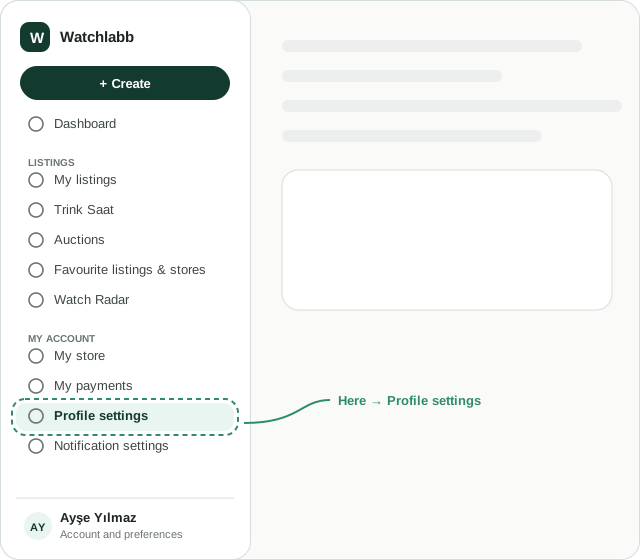
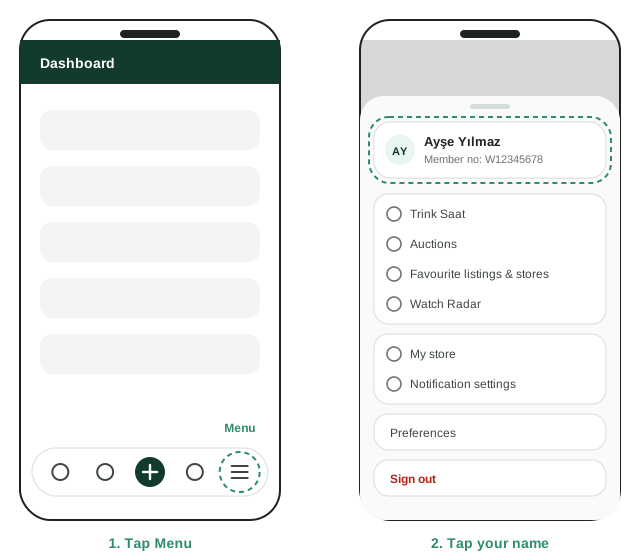
On desktop you reach Profile settings from the left menu; on mobile, from Menu.
- On desktop: In the left menu of your dashboard, click My account › Profile settings. On other pages of the site, you can also click your name at the top right and choose Profile settings.
- On mobile: Tap Menu at the bottom, then tap the card with your name at the top.
Which tabs are in Profile settings?
Profile settings has five tabs: Profile, Phone, Trink Saat payouts, Preferences and Listing form.
- Profile: photo, identity, display name, e-mail, address, billing details and account deletion.
- Phone: phone verification and signature code.
- Trink Saat payouts: the payout account you saved for a Trink Saat sale.
- Preferences: language, currency and appearance.
- Listing form: the currency and delivery options used for new listings.
How do I switch between Profile settings tabs on mobile?
On mobile, the tabs are in the tab selector in the top bar. Tap the selector and choose the tab you want from the Page tabs list. The list closes when you tap outside it or swipe it down.
Why can't I see the Trink Saat payouts tab?
The Trink Saat payouts tab only appears once you have saved a payout account for a Trink Saat sale. After you save one, the tab is added to Profile settings.
How do I open and close the menu on mobile?
Tap Menu in the bar at the bottom of the screen and the menu slides up. To close it, tap the empty area outside the menu or swipe it down. The menu also closes when you tap a page in it.
How do I collapse or expand the left menu on desktop?
Click the icon next to the logo at the top of the left menu to collapse it into a narrow strip of icons. To expand it again, click the icon below the logo. On narrower screens the menu opens as an icon strip; you can expand it whenever you like.
How do I open the sub-items in the menu?
On desktop, click a row that has sub-items, such as Auctions, to open them; click the same row again to close them. On mobile, tapping that row in Menu lists its sub-items on a new screen. To go back, tap the row name at the top (for example ‹ Auctions).
What does the red dot in the menu mean?
A red dot means there is something you need to do on a page in the menu. For example, if your phone number is not verified, a red dot appears next to Profile settings and the Phone tab. On mobile, the same dot also shows on the Menu button at the bottom.
How do I add, change or remove my profile photo?
In Profile settings › Profile, tap the button on the corner of your photo and choose Upload photo, Change photo or Remove photo. You can upload a JPG or PNG file of up to 5 MB. Then tap Save at the bottom.
My profile photo does not upload.
Make sure your photo is a JPG or PNG file of up to 5 MB. After choosing the photo, remember to tap Save at the bottom.
How do I change my first and last name?
If your identity is not verified yet, correct your name in Profile settings › Profile › Identity and tap Save. First and last names must be 2 to 50 characters long and may contain letters, spaces, hyphens and apostrophes. Once your identity is verified, you cannot change your name; if there is a mistake, tell us with the Report button in the same section.
Where can I find my member number?
Your member number is in the Identity section of Profile settings › Profile; you can copy it with the button next to it. On mobile, it is also shown on the card at the top of Menu.
How does my name appear on my listings?
You choose it in Profile settings › Profile › Display name: first name and initial (for example Ayşe Y.) or full name. The default is first name and initial.
Where do I change my date of birth and gender?
These are not edited in Profile settings. They are taken from your document during identity verification.
How do I add my address?
In the Address section of Profile settings › Profile, choose your country, fill in the address fields and tap Save. In Türkiye, enter your province, district, neighbourhood and street address; outside Türkiye, enter your city, postcode and address line.
Do I need to enter my address to post a listing?
Yes. To post a listing, a Trink Saat listing or an auction listing as an individual member, your full address must be saved in your profile. The seller card on your listings shows only your city and country.
Can other members see my address?
No. The seller card on your listings shows only your city and country. Your full address is not shown to other members.
Where do I change my billing address?
Invoices for individual members are issued to the address on the profile. Change it in Profile settings › Profile › Address and tap Save. If you have a store, the billing address for store invoices is in the store settings.
Why is my Turkish ID number requested under billing details?
Invoices for services you buy from Watchlabb are issued with this number. Members who pay in Turkish lira are asked for their Turkish ID number; other members are asked for a tax number. If the number was taken from your identity verification, it cannot be changed; if you entered it yourself, you can update it with Change.
How do I save changes in Profile settings?
When you make a change, tap Save on the You have unsaved changes bar that appears at the bottom. Tap Discard to undo your changes. If you try to leave the page without saving, you will see a warning.
Do I have to add an e-mail address?
No, it is optional. With the address you add, you can sign in by e-mail and receive account security notices.
How do I add or change my e-mail address?
You add your e-mail address in the E-mail section of Profile settings › Profile:
- Tap Add email, or Change if you already have an address.
- Enter your new address; a 6-digit code is sent to it.
- Enter the code within 10 minutes.
Once saved, Verified appears next to the address. Your old address stays in place until the new one is verified, and we send a notice to the old address when it changes.
Can I remove my e-mail address?
No. You cannot remove your e-mail address; you can only change it.
It says this e-mail is on another account.
This address is used on another Watchlabb account and cannot be added to a second one. Check that you typed it correctly. If you think this is a mistake, write to our support team.
Why does my profile say "No e-mail address"?
This appears when there is no e-mail address on your account, or when your account is registered with a hidden Apple address. You can add your real e-mail address with Add email in the E-mail section.
What is the signature code?
It is a personal security code, for example blue-eagle-47. WhatsApp messages from Watchlabb start with the line "Watchlabb signature: your code". If the code in the message matches yours, the message comes from Watchlabb.
Where can I see my signature code?
Go to the Signature code section of Profile settings › Phone and tap Show. This section only appears once your phone number is verified; your signature code is assigned when you verify your number.
How do I change my signature code?
In Profile settings › Phone › Signature code, tap Change. Type a new code yourself or tap Suggest, then tap Save.
- Your code must be 3–30 characters and use only letters and numbers.
- You can split it into up to 4 parts with hyphens, for example blue-eagle-47.
- You can change your code up to 5 times a day.
Who can see my signature code?
Only you. You can see it by tapping Show on the Phone tab of Profile settings. The Watchlabb team cannot see your code either and will never ask you for it.
Which number do Watchlabb's WhatsApp notifications come from?
Watchlabb's notification messages only come from +1 555 940 8677. This number does not accept messages; for questions, write to destek@watchlabb.com.
I got a WhatsApp message without a signature code.
Notification messages Watchlabb sends from +1 555 940 8677 start with your signature code; sign-in and verification code messages do not include it. Do not click links in a notification message that has no signature code or a code that does not match yours, and report it to destek@watchlabb.com.
Someone is asking me for my sign-in code or signature code.
Do not share these codes with anyone. Watchlabb will never ask you for your sign-in or verification codes or your signature code.
Is the signature code the same as the listing verification code?
No. Your signature code is a personal code that helps you recognise WhatsApp messages from Watchlabb. The code you write on paper and photograph with your watch when listing (for example K7Q3) is only for that listing.
What can I set on the Preferences tab?
On the Preferences tab you choose your language, currency and appearance. Your choices apply right away; there is nothing to save.
- Language: Türkçe or English. The site appears in the language you choose.
- Currency: USD, EUR or TRY. Listing prices are shown in this currency.
- Appearance: Light, Dark or System. With System, the appearance follows your device setting.
Can I see prices in Turkish lira?
Yes. Choose TRY as the currency on the Preferences tab of Profile settings. You see listing prices in Turkish lira; the price set by the seller does not change.
Where else can I change my language, currency and appearance?
On desktop, click the row with your name at the bottom of the left menu to open the language, currency and appearance options. On mobile, use the Preferences card in Menu. On the sign-in screen, you can also switch language with the Türkçe / English buttons at the bottom.
How do I get to Notification settings?
Notification settings has its own page. On desktop, click My account › Notification settings in the left menu. On mobile, tap Menu and choose Notification settings.
Which notifications can I turn on or off?
In Notification settings you can turn notifications on or off separately in these groups. Each switch saves right away.
- My listings: listing reminders, your listing going live and boosts.
- Favourites and following: price drops on favourites and your favourite stores.
- Watch Radar: a watch you are looking for being listed.
- Auctions: being outbid and new bids on your auction.
- Campaigns and news: separately for notifications, WhatsApp and e-mail.
If you have a store, the My store group also appears.
Why can I not turn off some notifications?
Notifications about your account, security, identity verification, payments and ongoing processes are important, so they are always sent.
I do not get push notifications.
Push notifications are turned on separately on each device. In Notification settings, turn on push notifications on this device on every device where you want them. Also make sure notifications are allowed in your browser or phone settings.
I cannot turn on the WhatsApp or e-mail notification switch.
WhatsApp notifications need a verified phone number, and e-mail notifications need an e-mail address on your account. Verify your phone in Profile settings › Phone and add your e-mail address on the Profile tab.
How do I stop offer messages on WhatsApp?
In Notification settings, turn off the WhatsApp switch on the Campaigns and announcements row.
How do I stop campaign e-mails?
In Notification settings, turn off the E-mail switch in the Campaigns and news row. You can turn off the Notification and WhatsApp switches in the same row separately too.
How do I set my listing form defaults?
You set them on the Listing form tab of Profile settings:
- Choose USD, EUR or TRY as your Default listing currency.
- Under Delivery options, turn on the options you usually offer: Shipping, In person (At the store for stores), Same day and International.
- Tap Save.
When you create a new listing, the form opens with these values filled in; you can change them on each listing.
If I change the defaults, do my existing listings change?
No. Defaults apply only to the listings you post from now on.
How do I delete my account?
At the bottom of the Profile tab in Profile settings, tap Delete my account, review what will be deleted and confirm. If you have an open store, a Trink Saat process in progress or an auction that is not settled, these must be completed first.
Why can't I delete my account?
Your account cannot be deleted in the cases below; the screen tells you what to do and shows a button to the relevant page:
- You have an open store: your store needs to be closed first.
- You have an ongoing Trink Saat process: wait until it is completed or ends.
- You have an unfinished auction: your scheduled or live lots, lots you are leading or have won, and sale offers awaiting a reply must be settled.
When is my account deletion completed?
Your account is deleted as soon as you tap Delete my account for good; there is no waiting period. You are signed out, and if your account has an e-mail address, we send an e-mail confirming the deletion.
What happens to my listings when I delete my account?
All your live, sold, pending, inactive and rejected listings are deleted with your account. Your Trink Saat listings, Watch Radar searches and favourites are deleted too. Deleted listings cannot be restored.
Is all my information deleted when I delete my account?
Some records are kept because of legal obligations. If you have used Watchlabb, your name, ID number, e-mail address, phone number and listing summaries with their cover photo are kept for 10 years. If you have never done so, only your member number and dates are kept.
Can I freeze my account for a while?
No. There is no option to freeze an account. You can delete your account or simply stop using it for a while.
Can I get my deleted account back?
No. Deletion cannot be undone. You can sign up again with the same phone number; your new account starts empty.
Didn't find your answer?
You can reach our support team on WhatsApp or by e-mail.